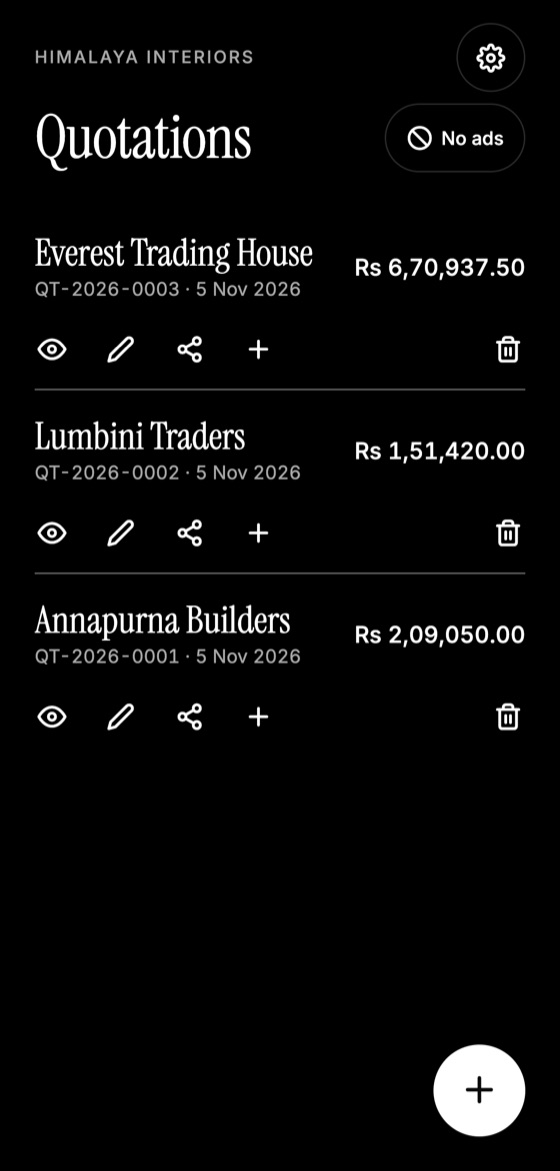
Many jobs are in basements, new buildings or remote areas where the signal drops out. If your quoting tool depends on the internet, you end up writing notes and trying to remember everything later. Working offline avoids that delay.
What should work offline
Look for a tool that lets you do the following without a connection:
- View your existing quotations and client details
- Create and edit quotations
- Calculate totals, tax and discounts
- Generate a PDF
Sending the file needs a connection, of course, but the work itself doesn't have to.
A simple on-site routine
- Measure and take photos while you're with the client.
- Create the quotation before you leave, while the details are fresh.
- Review it with the client in person if you can. Questions get answered immediately.
- Save the PDF to your phone.
- Send it as soon as you have signal.
If you have no signal, tell the client: "I've prepared your quotation and I'll send it this evening when I've got a connection."
Make this quotation on your phone. Add your company once, then create and share a PDF, even without internet.
Prepare before you go
- Keep your company details and logo set up.
- Note your usual material prices, as you won't be able to check a supplier's website.
- Use a past quotation for similar work as a starting point.
- Charge your phone, and carry a power bank on long days.
Be careful with prices
If you can't check a current supplier price offline, use a short validity period or wait to confirm that item before you send. Don't guess at an expensive material just to be fast.
Back up when you can
Data kept on one phone is only as safe as that phone. Save a backup regularly, especially before travel to rough sites.
Quotation Maker App Offline is free on Google Play. It stores your work on your phone and creates a clean A4 PDF you can share anywhere.
Keep reading
How to Make a Quotation on Your Phone
Create a professional quotation from your Android phone in minutes: set up your details once, add items, and share a PDF with your client.
Why You Should Send Quotations as PDF Files
PDF quotations look the same on every device, are harder to alter accidentally, and feel more professional. Here's when and how to use them well.
How Long Should a Quotation Be Valid?
How to choose a sensible validity period for your quotations, with typical timeframes, wording examples, and what to do when a quote expires.